For home cooks whose recipes are split between Instagram, food blogs and a box of handwritten cards, CookBook is a strong place to start. It brings those sources into a private recipe collection with meal planning and grocery lists. Paprika, Recipe Keeper, AnyList and Samsung Food are also worth considering, depending on whether you care most about cooking tools, printed cookbooks, shared shopping or finding new dishes.
This comparison uses the apps’ published features, checked in September 2026, rather than hands-on testing. The five picks cover different priorities: collecting from several sources, cooking from web recipes, preserving family recipes, sharing groceries and discovering meals.

Which recipe organizer fits your kitchen?
| App | Worth considering for | Check before committing |
| CookBook | Social posts, website recipes and paper recipes in one private collection | Free-plan limits and how your own recipes import |
| Paprika | Web recipe collecting, cooking tools and reusable meal plans | Separate purchases for different platforms |
| Recipe Keeper | Scanning family recipes and making printable cookbooks | Your preferred devices and cookbook layout options |
| AnyList | Households that need a shared grocery list first | Which recipe and planning tools need AnyList Complete |
| Samsung Food | Discovering recipes through communities as well as saving your own | Whether you want discovery alongside your personal collection |
CookBook: keep social, web and paper recipes together
CookBook is a private recipe manager app for saving, organizing, planning and shopping from recipes. It works across iOS, Android and the web, so you can tidy a recipe on a laptop and open it on a tablet in the kitchen.
Its appeal is the range of places you can collect from. You can import supported recipes from Instagram, TikTok, Facebook and Pinterest, save website recipes, and turn photos of cookbook pages or handwritten cards into editable recipes with AI Recipe Scanner. That suits someone who wants a family casserole and a newly saved pasta video in the same collection.
Once saved, recipes can be tagged, rated, marked as favorites and found through search and filters. You can plan meals by day, week or month, adjust servings and build editable shopping lists from recipe ingredients. CookBook combines ingredients, but you should still check the quantities and remove anything already in the pantry.
For example, you could import a weeknight pasta recipe, check that its ingredients match the original, and tag it “Quick dinners.” Add it to Thursday’s plan, adjust the servings for your household, then send the ingredients to a shopping list.
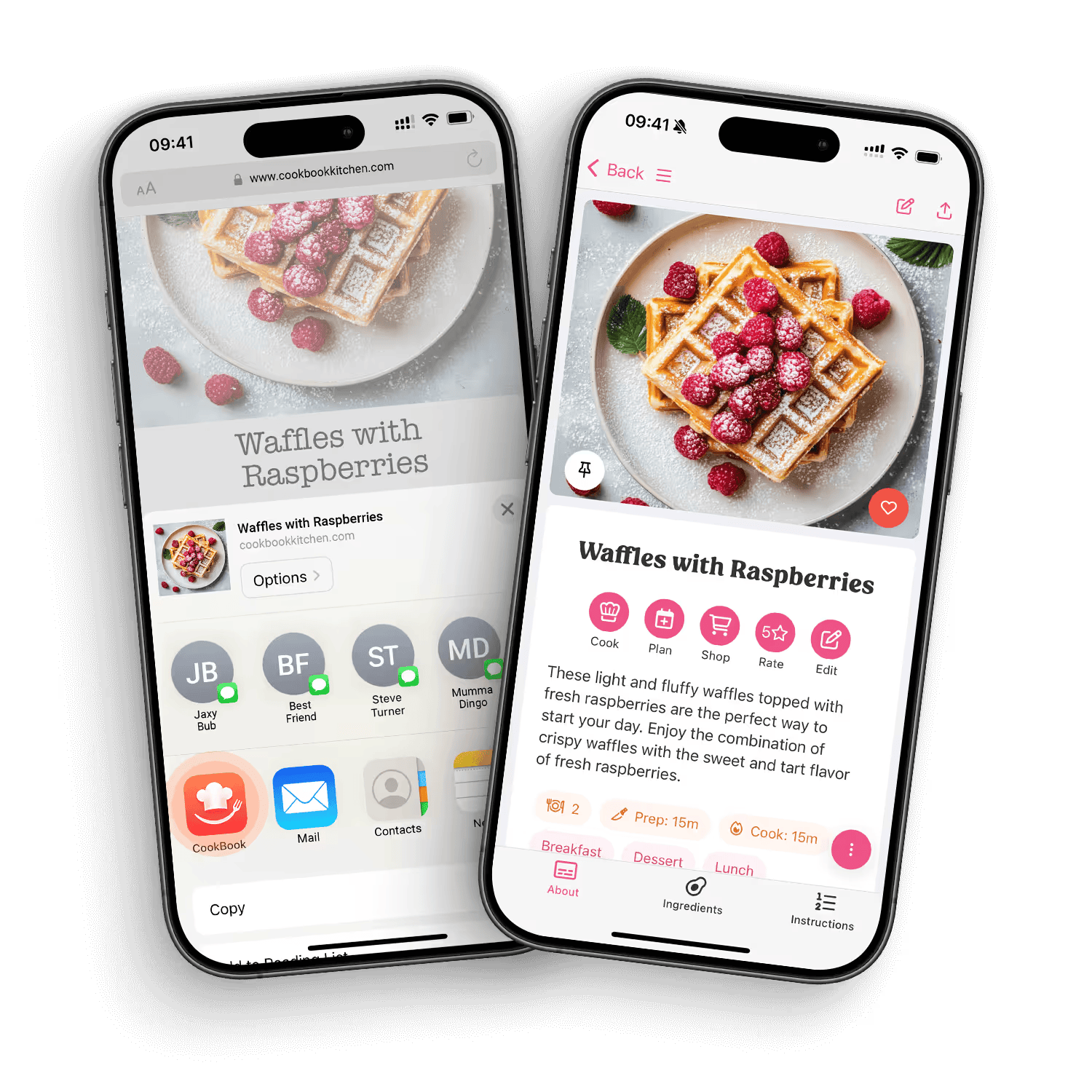
CookBook’s recipe-import screens. Image supplied by CookBook.
There are limits worth knowing. A private, deleted or incomplete social post may not import properly. Scanned handwriting can need corrections, especially fractions and abbreviations. CookBook has a limited free plan for up to 20 saved recipes. Its yearly Pro plan offers a 14-day free trial; check the current terms before starting a subscription.
Paprika: collect web recipes and cook from them
Paprika is worth a look if you mostly collect recipes from food websites. Its built-in browser saves recipes, while cloud sync carries recipes, grocery lists and meal plans between its supported apps.
The cooking tools are a good reason to compare it. You can cross off ingredients, highlight the step you are following, scale quantities and start timers detected in the directions. Its planner supports weekly and monthly plans, including reusable menus.
Paprika also combines similar ingredients on a grocery list and groups them by aisle. It is available for iOS, Android, Mac and Windows, but each version is sold separately. Work out the cost for the devices you actually use, rather than judging it by the phone app alone. If most of your collection is made up of website recipes, this could be enough without changing the way you find dinner ideas.
Recipe Keeper: turn family recipes into a printable cookbook
Recipe Keeper belongs on the shortlist for anyone sorting through family recipes. It can scan cookbook pages, handwriting, existing photos and PDFs into text, and it offers recipe search, ratings, favorites, meal plans and shopping lists.
It also supports imports from Instagram and TikTok, so it can hold newer finds alongside the family recipes.
A distinctive feature is its printable cookbook tool. You can arrange recipes into chapters, choose layouts and create a PDF cookbook to print or share. That could be particularly useful if some relatives want a digital copy while others would rather have a booklet.
Recipe Keeper supports iPhone, iPad, Android, Windows and Mac, with offline recipe access. Try a difficult handwritten card before moving the whole collection, and check the available purchasing options on your devices.
AnyList: start with the shared grocery list
AnyList makes sense when the biggest problem is two people shopping from different lists. Changes to a shared list appear for everyone using it, and items are grouped by category.
It also stores recipes and lets you add ingredients to a shopping list. The meal-planning calendar connects recipes to the week ahead. If the household already uses AnyList for groceries, trying those recipe tools may be easier than persuading everyone to adopt another app.
Meal planning, additional recipe-import features and computer access are part of AnyList Complete, so compare its paid features with the free app before deciding.
Samsung Food: find new dishes alongside your saved recipes
Samsung Food combines a personal recipe box with recipe discovery and communities. You can save website recipes, put dishes into a weekly plan and turn recipes or plans into shopping lists.
That mix suits someone who wants help finding dinner ideas, not only somewhere to store an existing collection. Communities can be useful for browsing recipes around different preferences and interests.
It is available on Android, iOS and the web. Compare the free offering with Food+ before choosing it for particular premium features. If your main goal is organizing a box of family cards, give the capture process more attention than the discovery feed. If you regularly run out of ideas, the feed may be part of the appeal.
Try a small collection before moving everything
Start with recipes you actually cook. Five useful dinners will tell you more than importing a hundred bookmarks that you have never opened twice.
Choose a few different sources: a complete recipe from a favorite food blog, a social post with the ingredients and method included, a handwritten card, and a recipe you have changed over the years. Photograph the whole card in even light, including both sides if the instructions continue on the back. Keep the originals while you check the copies.
Read each import from top to bottom. Confirm the servings, quantities, oven temperature and method. A recipe that says “add the sauce” is not ready if the sauce ingredients were in a second post that never came across.
Then see whether you can find it again without remembering the exact title. A few practical labels such as “School-night dinners,” “Freezer meals” and “Family baking” are enough to start. Add a note after cooking, such as which pan you used or whether you needed less sauce. Those details are often more useful next time than another category.
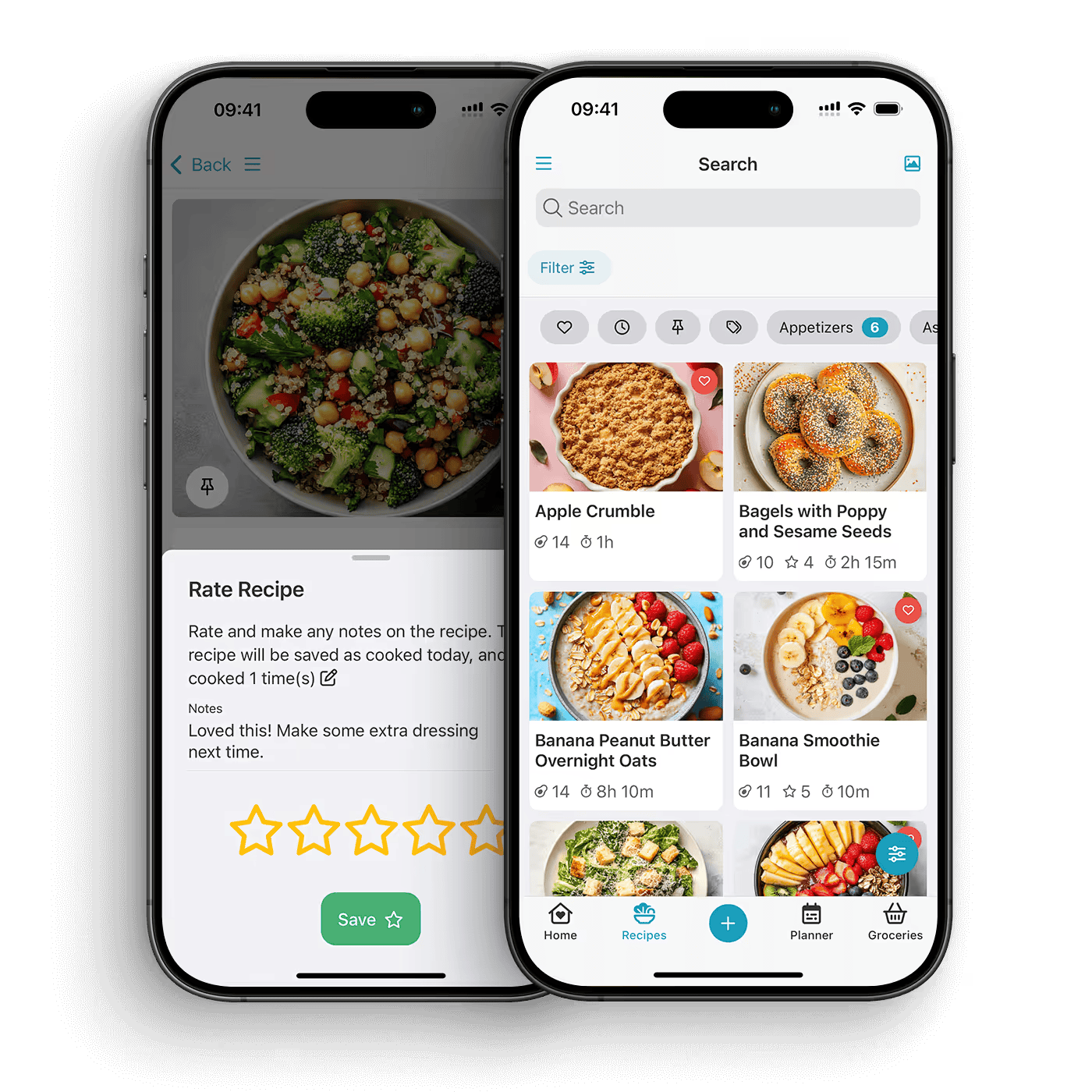
CookBook’s recipe collection and organization screens. Image supplied by CookBook.
Finally, plan three dinners and make a grocery list. Check the fridge first. Remove the rice you already have and add breakfast foods or household items that are not part of a recipe. See whether the list is easy to read on your phone in a store.
If someone else plans or shops with you, try the app’s sharing options together. Syncing your own devices is not the same as sharing recipes or lists with another person’s account.
Before transferring irreplaceable family recipes, check how the app exports or backs up your collection. Keep separate copies of original photos and notes. Syncing between devices is useful, but it should not be your only plan for keeping those originals safe.
Common questions about recipe organizer apps
Can I save recipes from Instagram and TikTok?
CookBook and Recipe Keeper both advertise social-recipe importing. Results depend on the source being accessible and containing enough recipe information. Check the saved ingredients and instructions rather than assuming that a short video contains a complete recipe.
Can an app read handwritten recipe cards?
Yes. CookBook and Recipe Keeper both offer scanning for handwritten recipes. Use a clear photo, review the result and keep the original image. If a quantity is illegible, check with the recipe’s owner rather than guessing.
Do I need a recipe app if I already use Pinterest?
Not necessarily. Pinterest can be enough for collecting ideas. A recipe organizer is worth considering when you want editable ingredients, your own notes, meal plans or grocery lists connected to those recipes. You can keep browsing Pinterest and save only the recipes you intend to cook.
Which app should I try first?
Try CookBook if you collect from several sources and want a private collection that connects to meal planning and shopping. Compare Paprika for web recipes and cooking tools, Recipe Keeper for printable family cookbooks, AnyList for shared groceries, or Samsung Food for recipe discovery. Start with the dinner you plan to cook this week.

- How to Plan a Summer Dinner Around the Weather - September 17, 2026
- How to Choose Door Hardware That Works With Your Interior Style - September 17, 2026
- Want Stronger, Healthier Hair? Check Your Diet Before Buying More Products - September 17, 2026